RAD PDF 3.44
 Wednesday, April 17, 2024 at 9:00AM
 Today, Red Software updates RAD PDF, a leading ASP.NET (3.5 / 4.x / Core / 5 / 6 / 7 / 8) web component & GUI for editing, form filling, redacting (experimental), signing, and viewing PDF files online. This version includes a new PdfSignatureInfo class, allowing for easier access to information in signed PDF fields.
Additionally, this RAD PDF release fixes a few minor bugs and adds a few new experimental features (like an API instance promise).
This update is available free of charge to customers with an active Maintenance Plan.
RAD PDF 3.43 Released
Tuesday, March 5, 2024 at 9:00AM Red Software is excited to announce RAD PDF 3.43, the newest release of its ASP.NET GUI / WebControl for PDF viewing, PDF form filling, PDF editing, PDF redaction, PDF signing, securing PDF content, and more. CspSaferRendering now also disables direct execution of PDF JavaScript, making it easier than ever for your RAD PDF implementation to comply with you Content Security Policy. Even with PDF JavaScript disabled (e.g. CspSaferRendering or DisablePdfJavaScript is true), RAD PDF can still parse the most common calculation and formatting scripts, safely computing them without direct JavaScript execution!
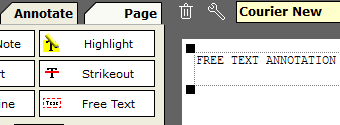
Free Text Annotations can now be added by the GUI, Client API and Server API. These annotations are often used for user editable "Typewriter" style text, etc.
This update also includes RAD PDF System Service improvements. The default memory footprint of the service has been reduced. It now also supports multiple reads of the same object from disk concurrently.
This new version includes a number of important bug fixes, including errors related to annotation opacity and redaction.
This update is available free of charge to all customers with an active Maintenance Plan.
RAD PDF 3.42 Released
Wednesday, January 31, 2024 at 1:00PM Today, Red Software publishes RAD PDF 3.42, its web-based GUI / WebControl for PDF editing, PDF form filling, PDF reading, PDF redacting, PDF signing and more! Now, more ready for the modern web, this release includes client side code refactoring to eliminate eval / inline JavaScript and styles using the new PdfWebControl.CspSaferRendering / PdfWebControlLite.CspSaferRendering property. This allows easier compliance with a website Content Security Policy (CSP) or other code security requirements.
This new version also addresses a number of bugs, primarily fixing issues involving advanced PdfLiteSession usage.
There are also new code samples shared on GitHub, including sample projects demonstrating how RAD PDF can be used with React.
This update is available free of charge to all customers with an active Maintenance Plan.
RAD PDF 3.41 Released
Tuesday, December 19, 2023 at 9:00AM Red Software is proud to announce RAD PDF 3.41, the newest version of its ASP.NET WebControl for PDF viewing, form filling, editing, redacting, signing, protecting, and more. Integrating PDF files and forms into any ASP.NET website has never been easier. With numerous mobile improvements, RAD PDF continues to be one of the most widely compatible PDF solutions. On touch devices, long press (e.g. press and hold) can be used to activate the PDF editing context menu / right click menu.
Additionally, this new release allows for new object upload customizations / integrations. The ObjectDataAddingEventArgs.Data property is now settable, enabling server side image processing of uploaded content (e.g. resizing, watermarks, etc). It also includes a new ObjectDataAddingEventArgs.ApplyExifOrientation property, allowing for RAD PDF to process the EXIF (Exchangeable image file format) tags of an image, specifically the orientation. If ApplyExifOrientation is set to true, the encoded orientation will also be the default image orientation on screen for a user. In many cases, this may be more what is "expected".
This update is available free of charge to all customers with an active Maintenance Plan.
RAD PDF 3.40 Released
Tuesday, October 24, 2023 at 9:00AM Today, Red Software updates RAD PDF, a leading ASP.NET (3.5+/Core/5/6/7/8) web component & GUI for editing, form filling, redacting (experimental), signing, and viewing PDF files online. This version includes a new PdfLiteSession.HttpContext property for use with ASP.NET Core/5/6/7/8 projects, allowing for easier access to the active context when working with RAD PDF callbacks.
Additionally, this RAD PDF release improves some PDF loading and repairing operations, as well as a fixed a parsing bug for oddly ended files.
This update is available free of charge to customers with an active Maintenance Plan.
ASP.NET, ASP.NET Core, pdf in Announcements, RAD PDF